MCP API Gateway & Portal
An enterprise-grade, high-performance API Gateway and Web Portal that translates standard REST/HTTP APIs into Model Context Protocol (MCP) tools dynamically. Specifically designed for highly secured, regulated, and air-gapped environments.
Features
- Dynamic MCP Tool Translation: Declare connection endpoints and map request body/parameters to JSON Schema templates. The gateway automatically generates MCP-compliant tool definitions.
- Dual MCP Transports:
- Streamable HTTP (recommended): stateless
POST /mcp(orPOST /sse) — a JSON-RPC request in, the response in the body. No pinned stream, so it scales across replicas. Used by Antigravity and by Claude Code (type: "http"). This matches the direction of the MCP 2026-07-28 spec, which makes the protocol fully stateless (drops theinitializehandshake andMcp-Session-Id); the legacy SSE transport below is on that spec’s 12-month deprecation path. - Legacy HTTP+SSE:
GET /sse(stream) +POST /messages; the response is also pushed back over the SSE stream. Used by clients configured withtype: "sse". - Distributed tracing: inbound W3C Trace Context headers (
traceparent/tracestate/baggage) are propagated into the gateway’s OpenTelemetry spans, so a trace that starts in the host/client SDK continues through tool execution and the downstream call.
- Streamable HTTP (recommended): stateless
- Enterprise Security (see
SECURITY_REVIEW.md):- Fail-closed config:
JWT_SECRETandGATEWAY_TOKENmust be ≥32 bytes or the process refuses to start — no usable default secrets. - Authorization, not just authentication: admin REST APIs are behind role-enforcing middleware (RBAC). Local admin login is enabled only when
ADMIN_PASSWORD(≥12 chars) is set; otherwise OIDC/SSO only. - SSRF egress guard: dial-time blocking of private/loopback/link-local addresses and DNS-rebind, plus an optional hostname allowlist.
- Token-Authenticated MCP Clients: scoped client tokens (glob scopes + roles), hashed at rest (SHA-256) and shown once. Header-only bearer tokens.
- OIDC/OAuth2 SSO with
stateCSRF + issuer/audience/expiry validation; mTLS & TLS 1.3. - Hardened edge: per-IP rate limiting, HTTP read/write/idle timeouts, request body-size caps.
- OAuth 2.1 resource server (opt-in,
OAUTH_ENABLED=true): advertises protected-resource metadata atGET /.well-known/oauth-protected-resource(RFC 9728), emitsWWW-Authenticatechallenges, and validates audience-bound (RFC 8707) JWT access tokens against the configured authorization servers’ JWKS. Coexists with the existing master/client-token auth. This makes the gateway a ready resource server for enterprise-managed authorization (ID-JAG) — a token minted through that flow validates on the same path. - Enterprise RBAC from IdP groups (opt-in,
OAUTH_GROUP_SCOPE_MAP/OAUTH_ADMIN_GROUPS): maps an OAuth token’s IdP group claims (claim name viaOAUTH_GROUPS_CLAIM, defaultgroups) to gateway scopes and the admin role, so a central IdP owns access policy. Fail-closed: when configured, IdP groups are authoritative (the token’s own scope claim is ignored) and a user in no mapped group gets no tool access; the admin role is granted only via an explicitly listed admin group. Unset ⇒ OAuth clients keep the flatuserrole + token scopes. - Tool-definition hash pinning (rug-pull defense): every tool carries a SHA-256
definitionHashand aversion(both surfaced intools/list). WithTOOL_PINNING_STRICT=true, a call is blocked if the tool’s definition changed since it was approved. - PII/secret redaction (DLP) (opt-in,
REDACTION_ENABLED=true): masks emails, Luhn-validated credit-card numbers, JWTs, AWS keys, API keys, and IBANs in tool arguments and downstream responses before they reach the LLM; redaction events are audit-logged (class + count only, never the value).
- Fail-closed config:
- OpenAPI → MCP import: turn an OpenAPI 3.x spec (JSON or YAML) into connections, endpoints, and tools in one shot — via
POST /api/import/openapi(admin) ormcp-cli import openapi <file|url>(supports--dry-runand--prefix). - Pluggable Security Vaults:
local(AES-256-GCM encrypted JSON file, single-node/dev) andpostgres(AES-256-GCM encrypted in the shared database — correct for multi-replica). Both derive their key fromVAULT_ENCRYPTION_KEY(falling back toJWT_SECRET); a pre-existing plaintextlocalfile is transparently migrated to ciphertext on first read.aws/gcp/azurefail closed until implemented. Connections store only a reference (auth_secret_ref) — the credential is injected server-side (bearer/basic/custom headers); the LLM never sees it. - Scales & self-heals: stateless gateway on shared PostgreSQL, HorizontalPodAutoscaler (2→10) + PodDisruptionBudget on Kubernetes; short-TTL config/secret/response caches, connection pooling, bounded retries, and
/healthz+/readyzprobes (seeSCALING_AND_CACHING.md). - Air-Gap Preparedness: A self-contained Go binary with embedded single-page assets (
//go:embed), local SQLite for single-node, and OpenTelemetry/Prometheus metrics.
Web Portal Walkthrough
The Janus Web Portal is a premium, secure single-page application built directly into the gateway binary, running locally in a modern dark-mode aesthetic. Here is a visual showcase of the interface:
1. Dashboard Overview & Real-Time Telemetry
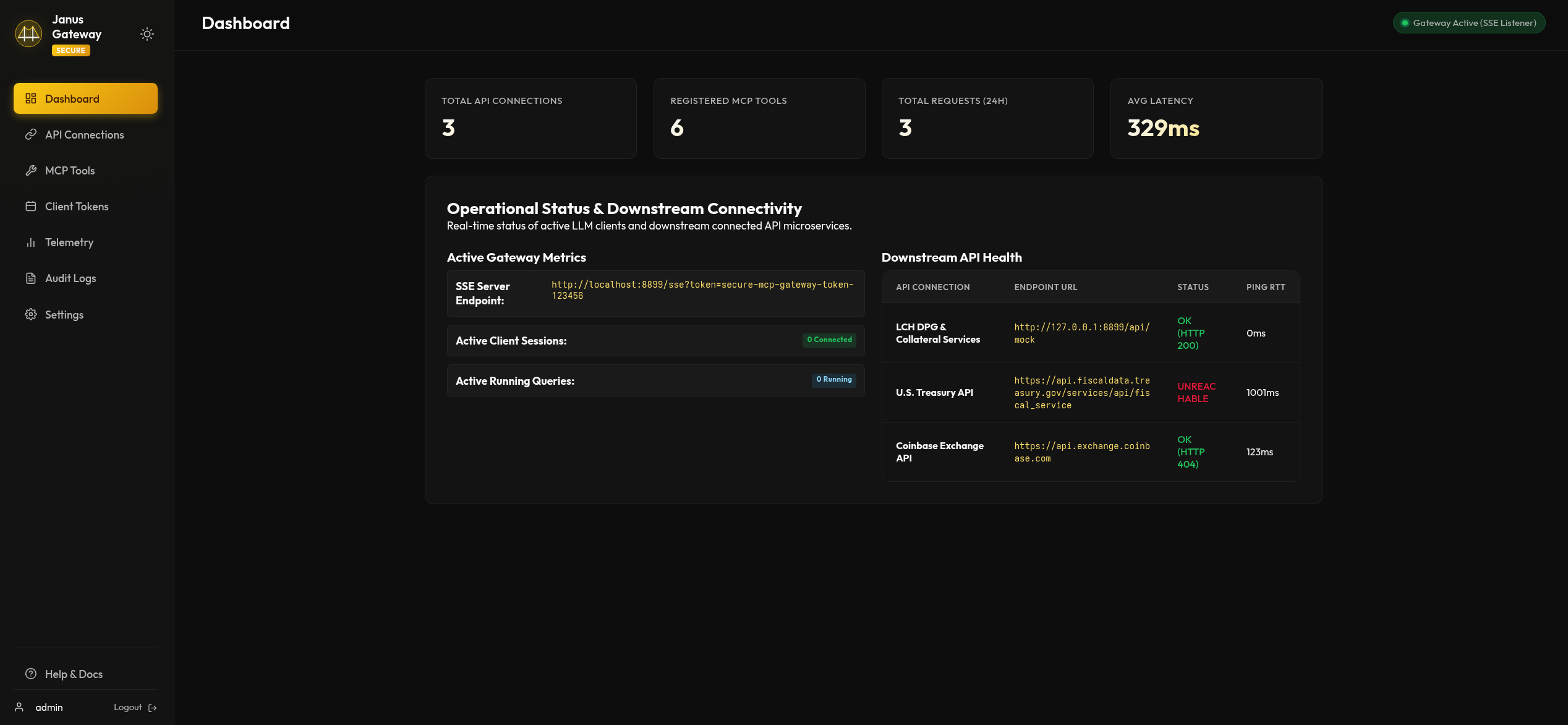
The main dashboard displays high-level operations metrics, component health diagnostics, request volume counters, and a chronological history of client access tokens.
| Dashboard Console | System Telemetry |
|---|---|
 |
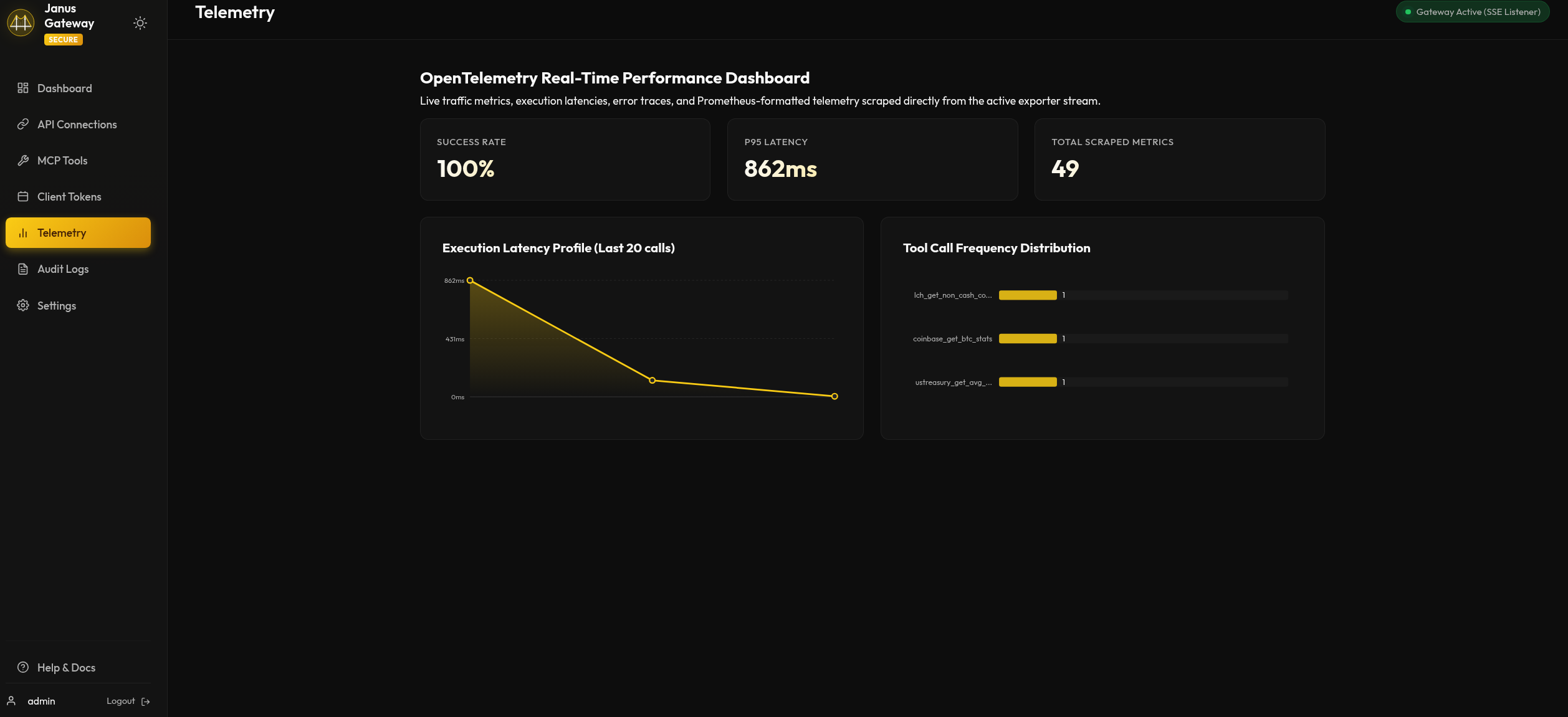 |
| Figure 1: Central gateway monitoring dashboard console. | Figure 2: Real-time traffic throughput and database telemetry metrics. |
2. Managing Target Connections & MCP Tools
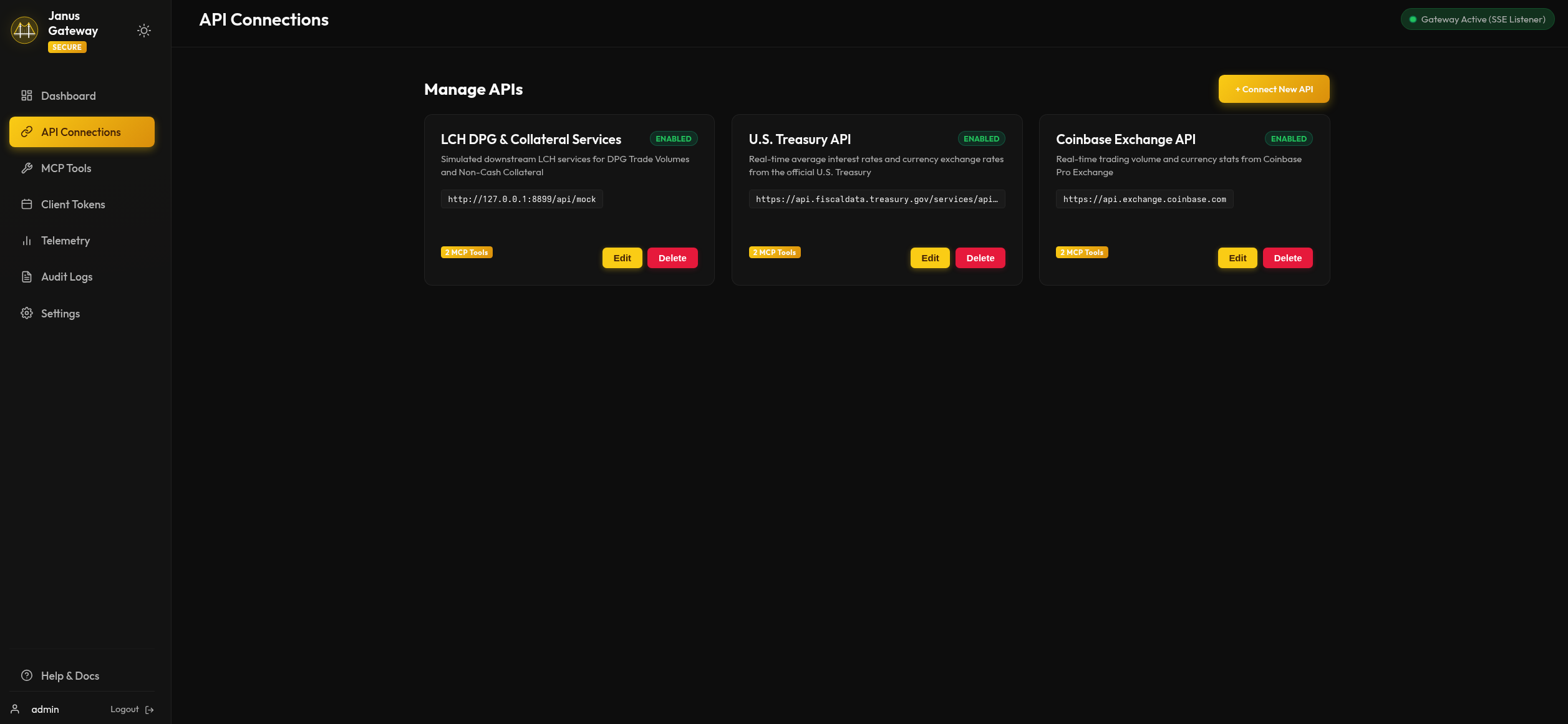
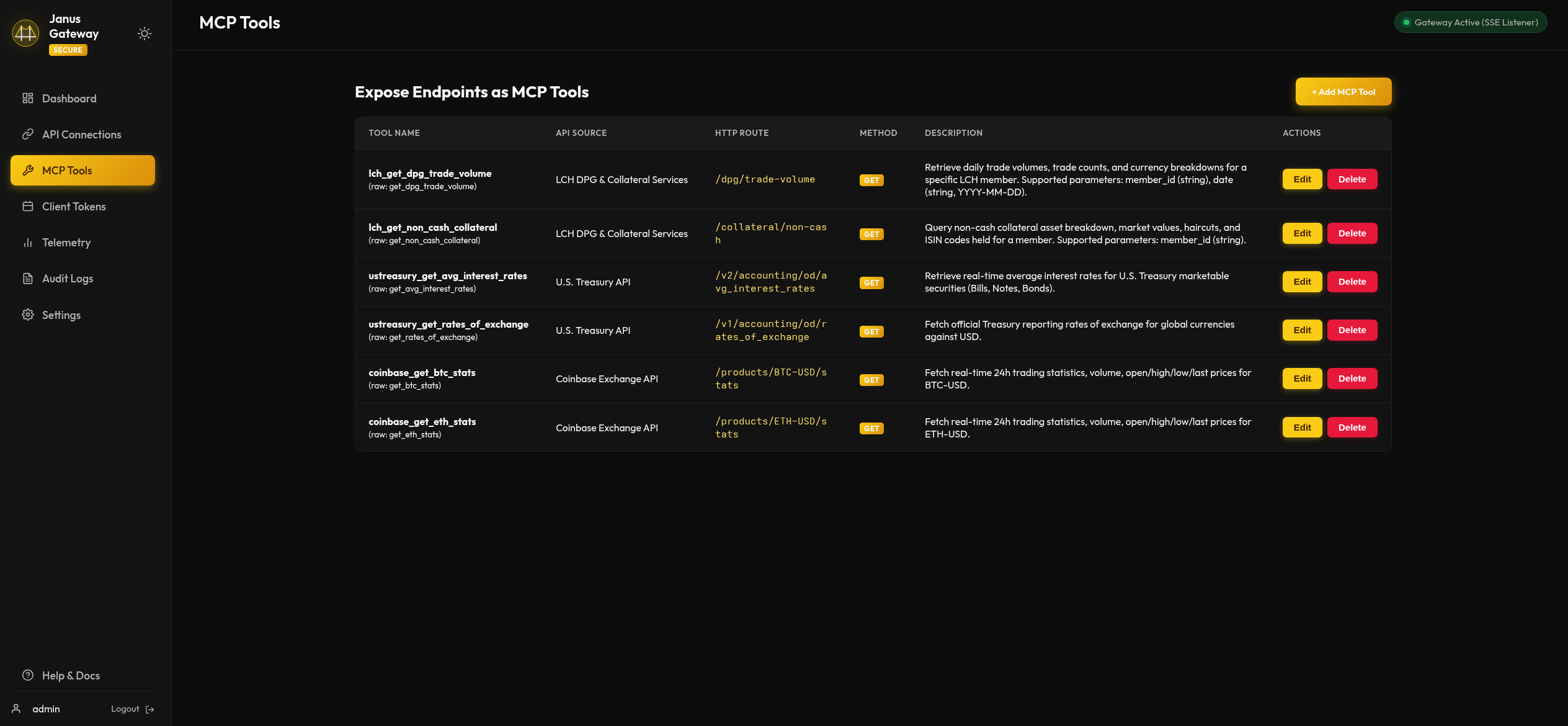
Administrators can register downstream REST targets, isolate them with custom tool prefixes, assign secure credentials from the vault, and map resource routes to MCP schema parameters.
| API Connections | Create Connection |
|---|---|
 |
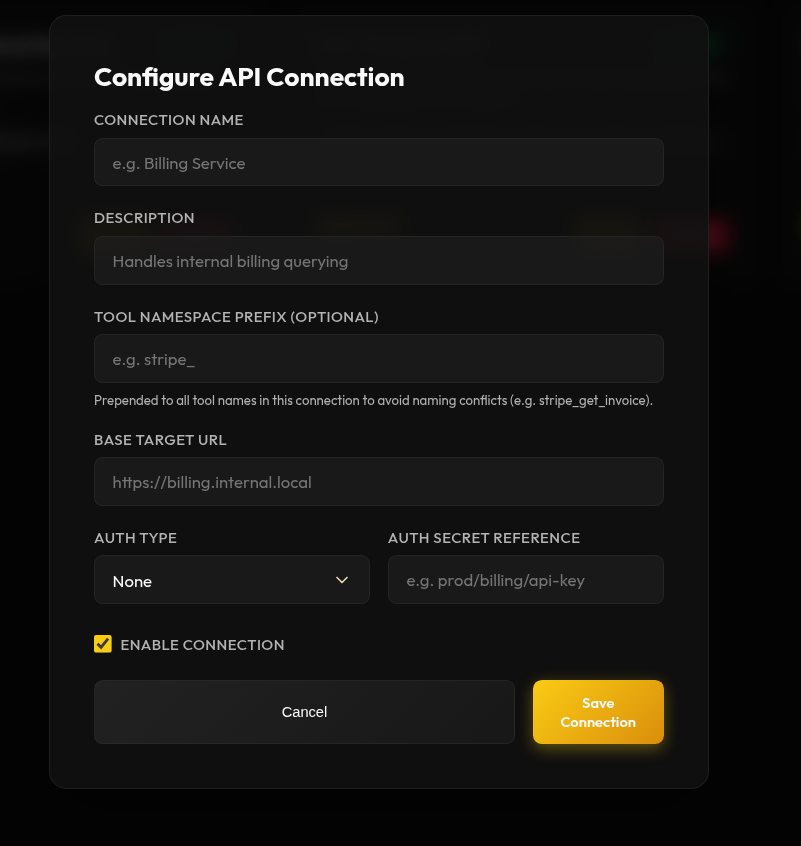 |
| Figure 3: Registered API connection configurations list. | Figure 4: Connection creation form with namespace prefix setup. |
| MCP Tool Mappings | Configure Dynamic Tool |
|---|---|
 |
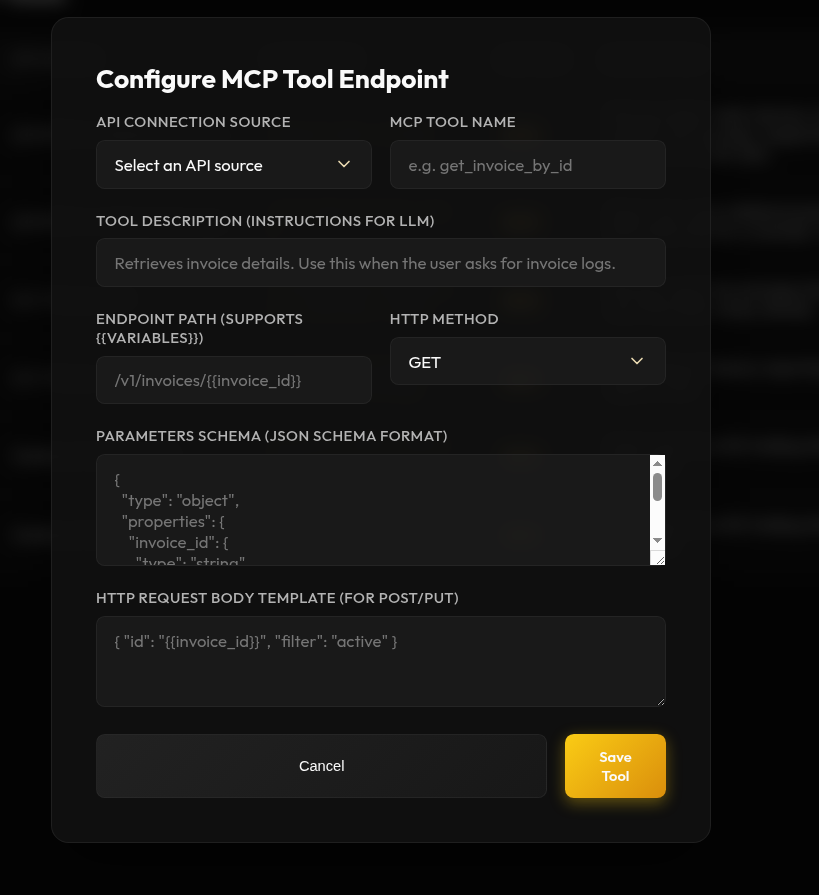 |
| Figure 5: Gateway MCP dynamic tool endpoints. | Figure 6: Mapping dynamic paths and request body JSON schemas. |
3. Security Vaults & Token Scoping
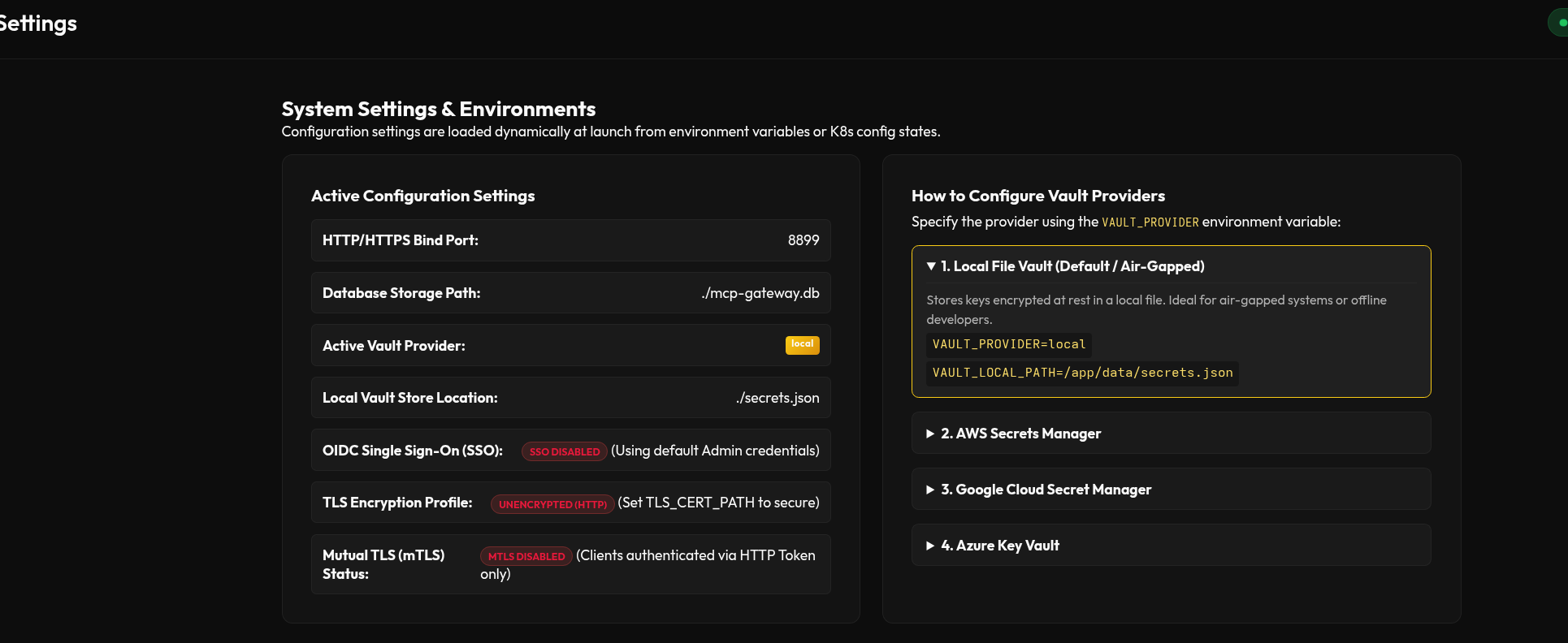
Manage credential stores and issue authorization bearer tokens for LLM clients (Claude, Antigravity, etc.) restricted to specific connection scopes.
| Pluggable Vaults | Scoped Client Tokens |
|---|---|
 |
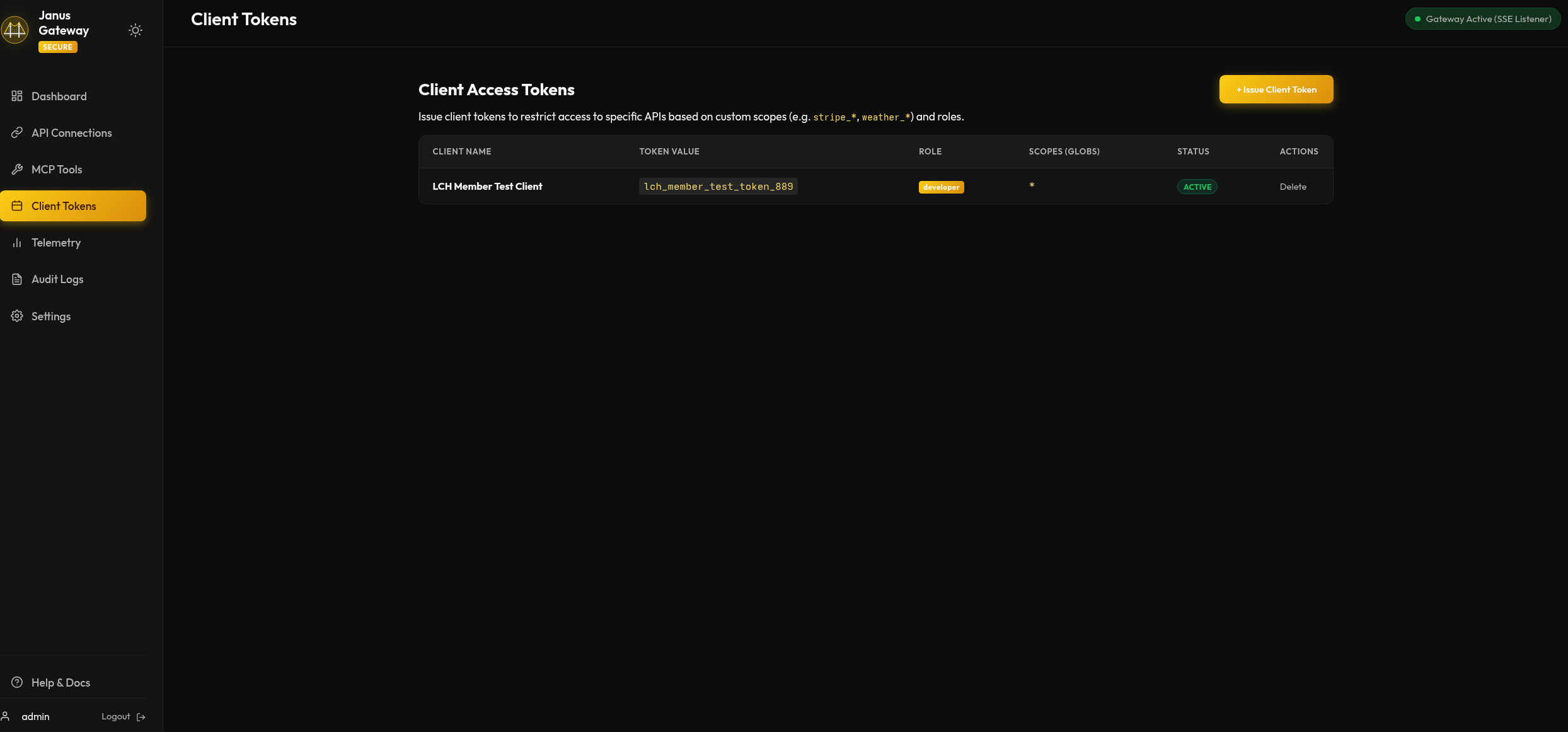 |
| Figure 7: Vault providers and secret references settings. | Figure 8: Issued bearer client tokens list. |
| Configure Vault Proxy | Issue Client Token |
|---|---|
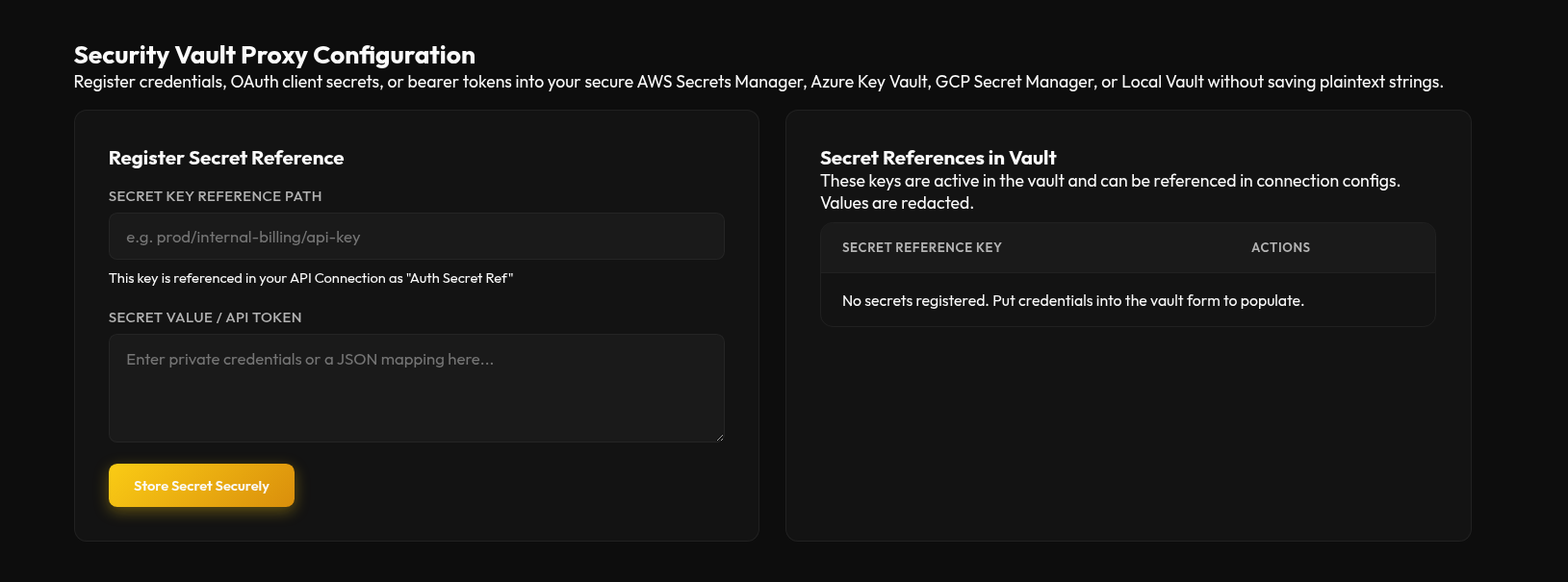 |
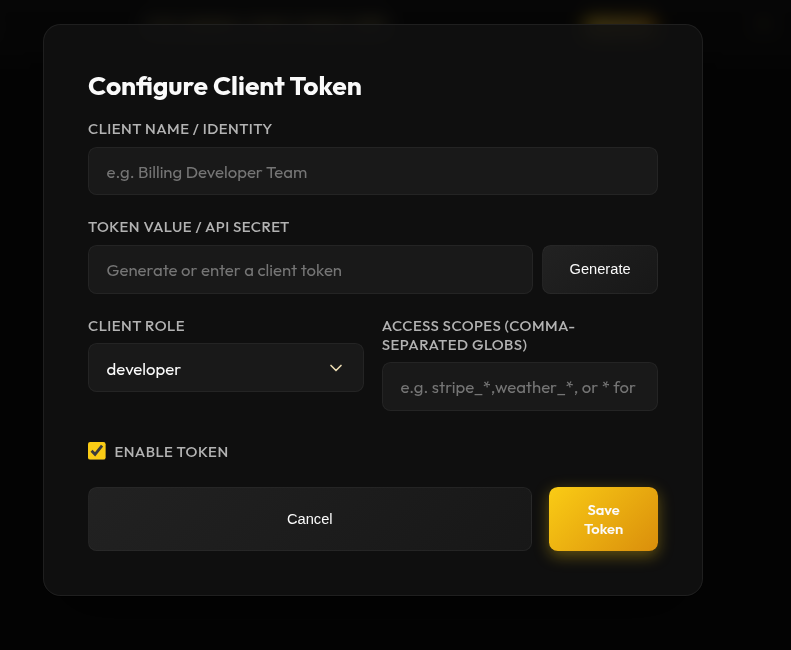 |
| Figure 9: Setting credential mapping endpoints. | Figure 10: Generating client tokens with restricted scope. |
4. Interactive OpenAPI & Swagger Documentation
The gateway automatically aggregates all dynamic tool endpoint parameters into a unified OpenAPI/Swagger schema, enabling interactive developer testing directly in the portal.
| OpenAPI Schema Preview | Swagger UI Endpoints |
|---|---|
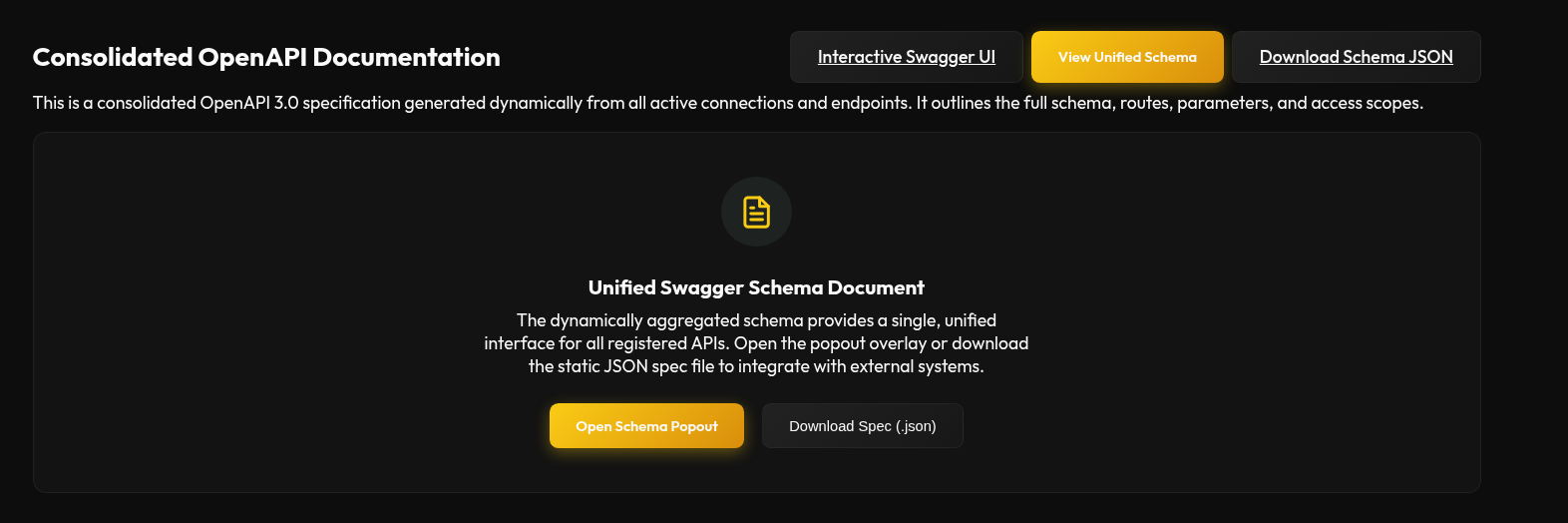 |
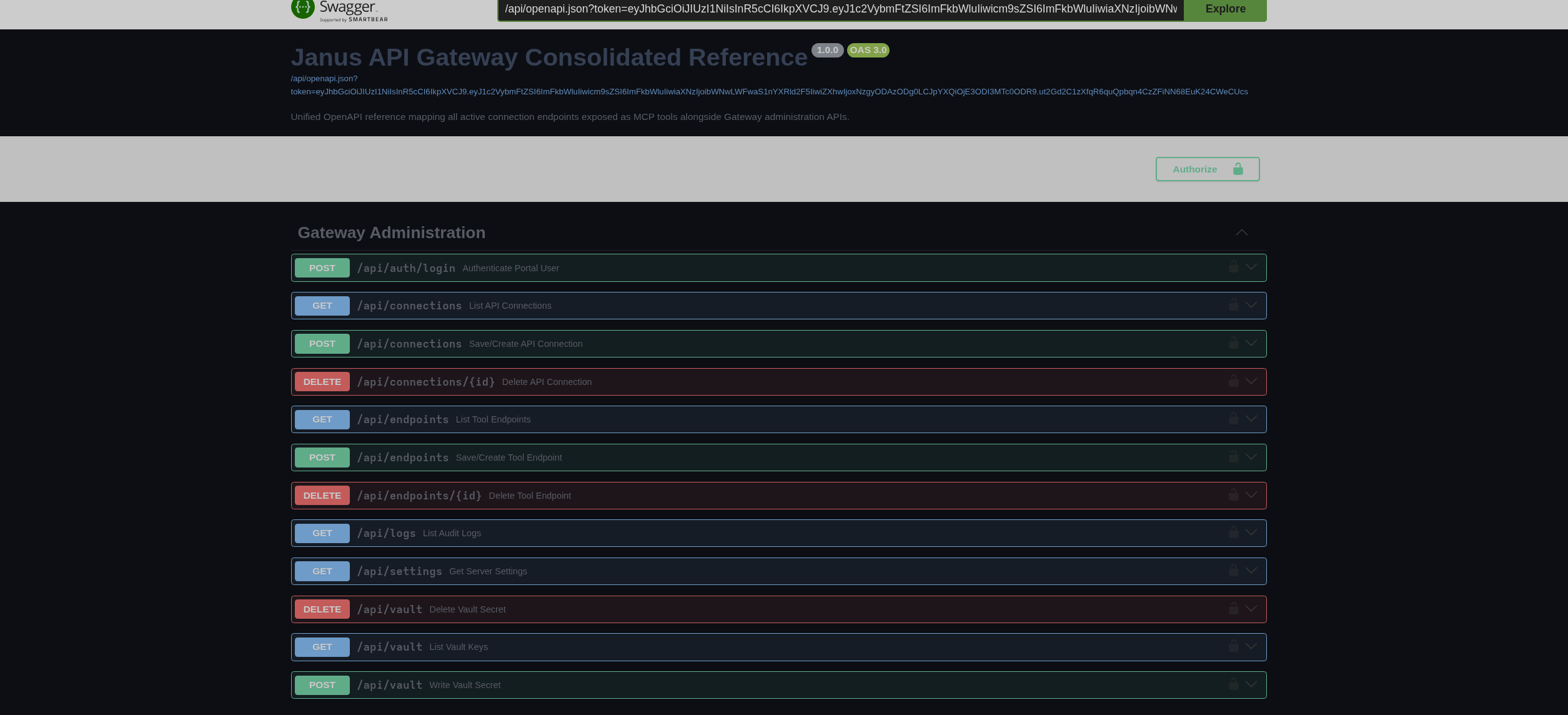 |
| Figure 11: Real-time Swagger JSON spec modal. | Figure 12: Interactive Swagger UI explorer. |
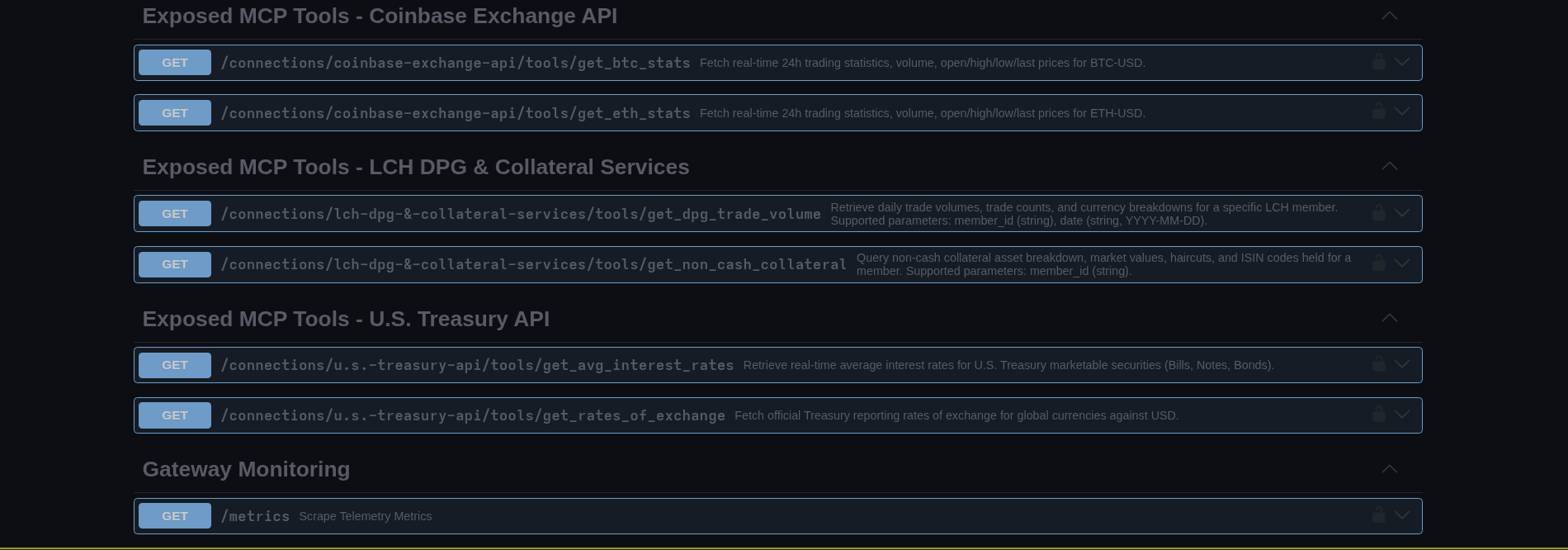 Figure 13: Live Swagger UI explorer for schema definitions and execution verification.
5. Audit Logging & Built-in Guides
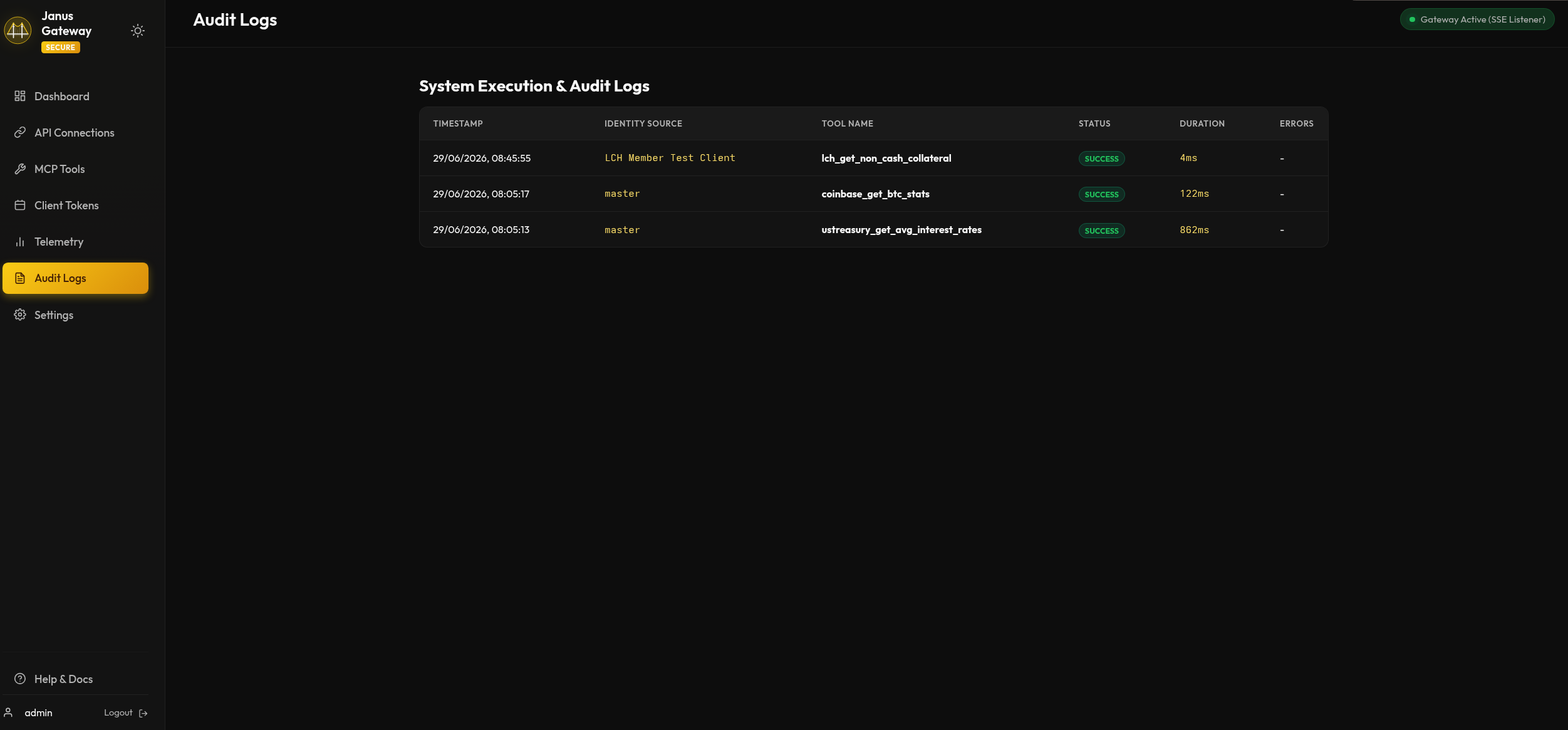
A complete compliance audit trail records all tool executions and changes, accompanied by built-in interactive guides for quick onboarding.
| Historical Audit Logs | Developer Guides |
|---|---|
 |
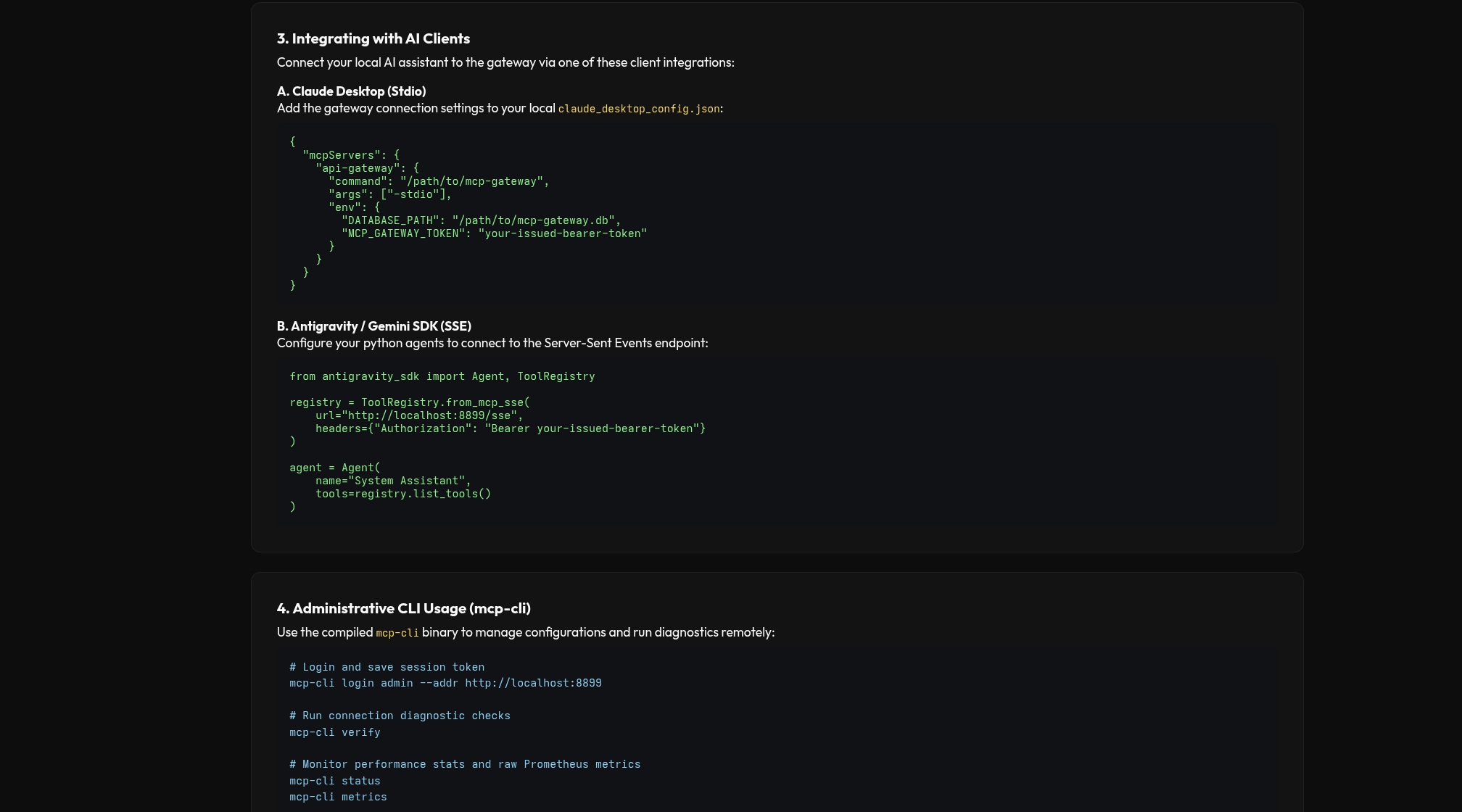 |
| Figure 14: Historical compliance audit trail. | Figure 15: Embedded client integration instructions. |
Technical Architecture
graph TD
    %% Custom Styling matching Gruvbox Dark
    classDef client fill:#3c3836,stroke:#83a598,stroke-width:2px,color:#ebdbb2;
    classDef gateway fill:#282828,stroke:#fe8019,stroke-width:3px,color:#ebdbb2;
    classDef vault fill:#3c3836,stroke:#b16286,stroke-width:2px,color:#ebdbb2;
    classDef storage fill:#3c3836,stroke:#b8bb26,stroke-width:2px,color:#ebdbb2;
    classDef target fill:#3c3836,stroke:#cc241d,stroke-width:2px,color:#ebdbb2;

    subgraph Client Space ["Client Space"]
        C["LLM Client (Claude/Antigravity)"]:::client
        P["Admin Web Portal"]:::client
        CLI["Admin CLI Client"]:::client
    end

    subgraph Janus ["Janus (MCP Gateway Core)"]
        direction TB
        Auth{"Auth Filter Middleware"}:::gateway
        Router{"Router/Dispatcher"}:::gateway
        Renderer["Template Engine"]:::gateway
        Audit["Audit Logger"]:::gateway
        OTel["OTel Metric Tracker"]:::gateway
    end

    subgraph Storage ["Storage & Auditing"]
        DB[("SQLite / Postgres configs")]:::storage
        Logs[("Audit Log Tables")]:::storage
    end

    subgraph Security ["Security Vaults"]
        Local["Local Encrypted JSON"]:::vault
        Cloud["Cloud Vault (AWS/GCP/Azure)"]:::vault
    end

    subgraph Internal ["Microservice Network"]
        API1["Internal REST API 1"]:::target
        API2["Internal REST API 2"]:::target
    end

    C -- "mTLS / SSE Token (TLS 1.3)" --> Auth
    P -- "OIDC / Session JWT" --> Auth
    CLI -- "Session JWT (REST)" --> Auth

    Auth -- "Valid?" --> Router
    Router -- "Read Configs" --> DB
    Router -- "1. Resolve Target URL" --> Renderer
    Router -- "2. Check Prefix Clashing" --> Renderer

    Renderer -- "3. Resolve Credentials" --> VaultResolver{"Secrets Resolver"}:::gateway
    VaultResolver -- "Local Adapter" --> Local
    VaultResolver -- "IAM / Instance Role" --> Cloud

    VaultResolver -- "4. Inject Headers & Call" --> API1
    VaultResolver -- "4. Inject Headers & Call" --> API2

    API1 --> Audit
    API2 --> Audit
    Audit --> Logs
    Audit --> OTel
Detailed Execution Sequence
Here is the exact sequence of validation, vault credentials resolution, routing execution, and metric audits during a single MCP tool call:
sequenceDiagram
    autonumber
    participant Client as LLM Client
    participant GW as MCP Gateway Core
    participant DB as SQLite/Postgres DB
    participant Vault as Secret Vault
    participant Target as Downstream API

    Client->>GW: POST /messages?sessionId=... (tools/call)
    Note over Client,GW: Content-Type: json, Auth: Bearer Token / mTLS Cert
    GW->>GW: Authenticate Caller & Extract Claims
    alt Authentication Failed
        GW-->>Client: HTTP 401 Unauthorized
    else Authentication Verified
        GW->>DB: Query Connection & Tool Schema (toolName)
        DB-->>GW: Return Base URL, Path, Parameters, Auth Settings

        GW->>GW: Substitute Path Parameters (e.g. /users/ -> /users/123)

        alt Authentication Required (AuthType != none)
            GW->>Vault: Fetch Credentials (AuthSecretRef)
            Vault-->>GW: Return decrypted token/credentials
            GW->>GW: Inject headers (Bearer / Basic / Custom)
        end

        GW->>Target: Execute HTTP Request (GET/POST/etc.)
        alt Target API Timeout / Down
            Target-->>GW: Connection Refused / Timeout
            GW->>DB: Log Failed Execution (status=failure)
            GW-->>Client: Return JSON-RPC Error -32603
        else Target API Responds
            Target-->>GW: Return HTTP Payload (JSON/Text)
            GW->>GW: Clean and Format Response (Pretty JSON / Markdown)
            GW->>DB: Log Successful Execution (status=success, duration)
            GW-->>Client: Return JSON-RPC Response Content (Text/Markdown)
        end
    end
Quick Start
1. Using Nix & Devenv
The repository comes equipped with a declarative Nix Flake and a devenv shell environment.
To activate the development shell:
# Allow direnv to auto-enter shell
direnv allow

# Or enter manually using devenv
devenv shell
Available scripts inside the devenv shell:
run-dev: Starts the gateway web portal onhttp://localhost:8080(or https depending on configuration).build: Compiles the binary to./mcp-gateway.lint: Runs Golangci-lint checking rules.test: Executes backend unit tests.
2. Using Docker Compose
Run the stack using the pre-configured compose setup:
docker-compose up -d --build
This builds the multi-stage production container, mounts a persistent volume for the local SQLite file (secrets.json and mcp-gateway.db), and exposes the UI at http://localhost:8080.
Operating Modes
A. Server Mode (Portal & SSE) - Default
Exposes the web configuration dashboard (Portal) and the Server-Sent Events (SSE) stream listener.
To run:
go run main.go
SSO Configuration: Set the following environment variables to activate OIDC:
OIDC_ISSUER: Issuer URL (e.g.https://keycloak.company.com/realms/internal)OIDC_CLIENT_ID: OAuth client identifierOIDC_CLIENT_SECRET: OAuth client secret token
SSL/TLS & mTLS Configuration:
TLS_CERT_PATH: Path to server certificate PEM.TLS_KEY_PATH: Path to server private key PEM.CLIENT_CA_PATH: Path to CA bundle (activates Mutual TLS).
B. Stdio Mode (CLI Wrapper)
Used by local desktop clients (like Claude Desktop) to invoke tools through stdin/stdout.
To configure Claude Desktop to use this gateway:
Add the following connection to claude_desktop_config.json:
{
  "mcpServers": {
    "api-gateway": {
      "command": "/path/to/mcp-gateway",
      "args": ["-stdio"],
      "env": {
        "DATABASE_PATH": "/path/to/mcp-gateway.db",
        "VAULT_PROVIDER": "local",
        "VAULT_LOCAL_PATH": "/path/to/secrets.json"
      }
    }
  }
}
Connecting MCP Clients (remote)
For the deployed gateway, point clients at the HTTP(S) endpoint with a bearer token (the master GATEWAY_TOKEN for admin/*, or a scoped client token).
Claude Code — .mcp.json in the project root, using the stateless Streamable HTTP transport:
{
  "mcpServers": {
    "janus-gateway": {
      "type": "http",
      "url": "https://<gateway-host>/mcp",
      "headers": { "Authorization": "Bearer ${JANUS_GATEWAY_TOKEN}" }
    }
  }
}
Antigravity — register the server in Antigravity’s MCP config (~/.gemini/antigravity/mcp_config.json; it does not read a repo-local file). Antigravity uses Streamable HTTP against /sse:
{ "mcpServers": { "janus-gateway": {
  "serverUrl": "https://<gateway-host>/sse",
  "headers": { "Authorization": "Bearer <token>" } } } }
Legacy type: "sse" clients also work (GET /sse + POST /messages); prefer /mcp for multi-replica.
Demos
The repo ships two end-to-end demos (via just) that drive real LLM agents against the live gateway and generate a governed financial report. Both aggregate LCH collateral + US Treasury + Bank of England + ECB FX + Eurostat through the single gateway and consolidate a multi-currency portfolio into a GBP value (~£36.39M). A sample output is committed at doc/sample_crosscurrency_collateral_report.md.
| Recipe | Script | Agent | What it does |
|---|---|---|---|
just demo-claude |
scripts/demo_janus_claude.sh |
Claude Code (claude -p) |
Loads janus via .mcp.json (/mcp) and produces a Cross-Currency Collateral Valuation & Multi-Jurisdiction Rate Audit for member MEM-LCH-002. |
just demo-antigravity |
scripts/demo_janus_mcp.sh |
Antigravity (agy --print) |
Runs the lch-collateral-reporting skill (in .agents/skills/) to produce the same report. |
just mcp-config-claude |
— | — | Prints the Claude Code MCP config (.mcp.json). |
Prerequisites & notes
- Claude demo: the
claudeCLI + a claude.ai subscription. The script unsetsANTHROPIC_API_KEYso it uses the subscription (not the pay-as-you-go API key). Override the gateway token withJANUS_GATEWAY_TOKEN=... just demo-claude. - Antigravity demo: the
agyCLI, withjanus-gatewayregistered in~/.gemini/antigravity/mcp_config.json. The skill lives in.agents/skills/lch-collateral-reporting/. - Both are billable LLM runs (five tool calls each). They print the generated report to stdout.
Configuration Settings
Configure the gateway using standard environment variables. A full template is in .env.example.
Required (fail-closed — the process refuses to start without them):
| Variable | Purpose |
|---|---|
JWT_SECRET |
Signs portal JWT sessions. Must be ≥32 bytes. |
GATEWAY_TOKEN |
Master bearer token for MCP clients (→ admin/*). Must be ≥32 bytes. |
Core / storage / vault:
| Variable | Default | Purpose |
|---|---|---|
PORT |
8080 |
Port for the Web Portal and MCP endpoints. |
DATABASE_PATH |
./mcp-gateway.db |
Local SQLite file. |
DATABASE_URL |
"" |
PostgreSQL URI (postgres://…). Overrides DATABASE_PATH; required for multi-replica. |
VAULT_PROVIDER |
local |
local, postgres (implemented) or aws/gcp/azure (fail closed). |
VAULT_LOCAL_PATH |
./secrets.json |
JSON vault file (provider local). |
VAULT_ENCRYPTION_KEY |
(falls back to JWT_SECRET) |
AES-256-GCM key source for the local and postgres vaults. |
Auth / SSO / TLS:
| Variable | Default | Purpose |
|---|---|---|
ADMIN_USERNAME / ADMIN_PASSWORD |
admin / (empty) |
Local admin login. Disabled unless password (≥12) is set. |
OIDC_ISSUER / OIDC_CLIENT_ID / OIDC_CLIENT_SECRET |
"" |
OpenID Connect SSO. |
OIDC_DEFAULT_ROLE |
admin |
Role granted to SSO users. |
PUBLIC_BASE_URL |
"" |
Public URL used to build the OIDC redirect URI. |
TLS_CERT_PATH / TLS_KEY_PATH / CLIENT_CA_PATH |
"" |
HTTPS cert/key; CA bundle activates mTLS. |
TLS_TERMINATED_AT_PROXY |
false |
Set when TLS is terminated upstream (e.g. an nginx ingress) rather than by this pod, so the portal reports the deployment’s TLS posture correctly. |
MTLS_MODE |
off |
off, optional, or required — mutual-TLS enforcement, whether enforced in-pod or by an upstream proxy/ingress. See TLS & mTLS below. |
Security policy / performance / demo:
| Variable | Default | Purpose |
|---|---|---|
EGRESS_ALLOWLIST |
"" |
Comma-separated downstream hostname allowlist (empty = any public host). |
EGRESS_ALLOW_PRIVATE |
false |
Permit calls to private/loopback ranges (local/demo only). |
CORS_ALLOWED_ORIGINS |
"" |
Allowed SSE/CORS origins (empty = none). |
METRICS_TOKEN |
"" |
Bearer token to scrape /metrics (empty = open). |
CONFIG_CACHE_TTL / SECRET_CACHE_TTL / RESPONSE_CACHE_TTL |
5s / 30s / 0 |
TTLs for topology / secret / idempotent-GET caches. |
DB_MAX_OPEN_CONNS / DB_MAX_IDLE_CONNS |
25 / 10 |
DB connection pool. |
DOWNSTREAM_RETRIES |
2 |
Bounded retries (backoff) for idempotent downstream calls. |
SEED_DEMO_DATA |
false |
Seed demo connections/tools on first boot. |
OAuth 2.1 resource server (all off unless OAUTH_ENABLED=true):
| Variable | Default | Purpose |
|---|---|---|
OAUTH_ENABLED |
false |
Enable the OAuth 2.1 resource-server surface (metadata endpoint, WWW-Authenticate challenges, JWKS-based token validation). Existing master/client-token auth still works. |
OAUTH_RESOURCE_URI |
"" |
This gateway’s resource identifier, advertised in the protected-resource metadata and required as the token audience (RFC 8707). |
OAUTH_AUTHORIZATION_SERVERS |
"" |
Comma-separated authorization-server issuer URLs whose JWKS are trusted to sign access tokens. |
OAUTH_SCOPES_SUPPORTED |
"" |
Comma-separated scopes advertised in the protected-resource metadata. |
Tool pinning & redaction (DLP) (off by default):
| Variable | Default | Purpose |
|---|---|---|
TOOL_PINNING_STRICT |
false |
Block a tools/call when the tool’s definitionHash no longer matches the approved definition (rug-pull defense). Hashes/versions are surfaced in tools/list regardless. |
REDACTION_ENABLED |
false |
Mask PII/secrets (emails, Luhn-validated cards, JWTs, AWS keys, API keys, IBANs) in tool arguments and downstream responses before they reach the LLM; events are audit-logged as class + count only. |
TLS & mTLS
On the live EKS deployment, TLS is terminated at the nginx ingress (cert-manager,
ClusterIssuer letsencrypt-prod), not by the gateway pod itself — TLS_TERMINATED_AT_PROXY=true
tells the portal to reflect that instead of misreporting an ingress-terminated deployment
as unencrypted. MTLS_MODE (off / optional / required) separately reports the
mutual-TLS posture, whether mTLS is enforced in-pod (via TLS_CERT_PATH / TLS_KEY_PATH /
CLIENT_CA_PATH) or by an upstream proxy/ingress verifying client certs on the gateway’s
behalf.
Client-certificate mTLS is off by default and is not required for normal MCP client
use (bearer token / JWT auth keeps working regardless). To enable optional mTLS at
the ingress — so clients that do present a cert get verified, without breaking existing
token-only clients — follow the runbook in
deployment/mtls/README.md.
Importing an OpenAPI spec
Bootstrap a connection and its tools from an existing OpenAPI 3.x document (JSON or YAML) instead of registering endpoints by hand.
Via the admin REST API (JWT + admin role):
curl -X POST https://<gateway-host>/api/import/openapi \
  -H "Authorization: Bearer <admin-jwt>" \
  -H "Content-Type: application/json" \
  -d '{"url": "https://api.example.com/openapi.json", "prefix": "example_"}'
Via the CLI (--dry-run previews the generated connection/tools without writing; --prefix namespaces the tools):
# From a local file
mcp-cli import openapi ./petstore.yaml --prefix petstore_ --dry-run

# Or straight from a URL
mcp-cli import openapi https://api.example.com/openapi.json --prefix example_
Administrative & Monitoring CLI (mcp-cli)
For administrators and operators, the gateway includes a standalone, cross-platform CLI tool (mcp-cli) compiled for macOS (Intel/Apple Silicon), Linux, and Windows. The CLI connects remotely to the Gateway REST API over HTTPS/HTTP, providing complete administration, verification, and performance monitoring capabilities.
1. Build Instructions
To build the CLI for your current platform:
just build-cli
To cross-compile for all systems (outputs saved in dist/):
just build-cli-all
2. Available Commands
- Authentication:
mcp-cli login <username> --addr <gateway-url>Authenticates with the gateway server and caches the session token in the user configuration directory (
~/.config/mcp-gateway/cli.json). - Diagnostics & Verification:
mcp-cli verifyRuns a comprehensive health check: pings the gateway server, verifies database schemas, checks vault integration, and validates outbound network connectivity for all downstream API endpoints.
- Performance & Telemetry Monitoring:
mcp-cli status # Shows gateway settings, active port, vault provider, and mTLS status mcp-cli metrics # Fetches and parses scrapable Prometheus metrics for live status tracking mcp-cli logs # Lists the last 100 tool execution audit logs (status, duration, error messages) - API Connections CRUD:
mcp-cli connection list mcp-cli connection add --name <name> --url <url> [--prefix <prefix>] [--auth <type>] [--secret <ref>] mcp-cli connection modify --id <uuid> [--name <name>] [--url <url>] [--prefix <prefix>] [--enabled <true|false>] mcp-cli connection delete --id <uuid> - Tool Endpoints CRUD:
mcp-cli endpoint list mcp-cli endpoint add --conn-id <conn-uuid> --name <tool-name> --desc <description> --path <route> --method <HTTP-method> mcp-cli endpoint modify --id <endpoint-uuid> [--name <name>] [--path <route>] [--method <HTTP-method>] mcp-cli endpoint delete --id <endpoint-uuid> - Vault Secrets Management:
mcp-cli vault list mcp-cli vault set --key <secret-path> --val <secret-value> mcp-cli vault delete --key <secret-path> - OpenAPI Import (generate connection + endpoints/tools from an OpenAPI 3.x spec):
mcp-cli import openapi <file|url> [--prefix <prefix>] [--dry-run]
Integrating with Secret Vaults
Sensitive auth tokens are retrieved at query runtime from your chosen vault. The connection stores only a reference (auth_secret_ref) — the gateway resolves it and injects the credential server-side, so the LLM never sees it. Rotate the secret in the vault and every tool using it updates instantly.
Provider (VAULT_PROVIDER) |
Status | Storage |
|---|---|---|
local |
✅ Implemented | AES-256-GCM encrypted JSON file (VAULT_LOCAL_PATH) — single-node/dev. Any pre-existing plaintext file is migrated to ciphertext once, on first read. |
postgres |
✅ Implemented | AES-256-GCM encrypted in the shared PostgreSQL DB — correct for multi-replica |
aws / gcp / azure |
⛔ Fail closed | Not yet implemented — refuses to start (never returns fake secrets) |
Both encrypting vaults derive their key from
VAULT_ENCRYPTION_KEY, falling back toJWT_SECRETif it is unset.
Per-connection auth_type — how the gateway injects the resolved secret:
auth_type |
Header injected | Vault secret format | Example |
|---|---|---|---|
none |
— | — | Public APIs (BoE, ECB, Eurostat…) |
bearer |
Authorization: Bearer <secret> |
the token | OAuth/token APIs |
basic |
HTTP Basic | user:pass |
UK Companies House = <APIKEY>: |
custom_headers |
arbitrary headers | JSON map | FCA register = {"X-Auth-Email":"…","X-Auth-Key":"…"} |
Known limitation: credentials are injected as headers only. APIs that require the key as a query parameter need a small future
query_paramauth type — most APIs offer anX-API-Keyheader alternative (usecustom_headers).
Storing a Secret
In the Portal Security Vault view (or POST /api/vault), insert the secret mapping, then set the connection’s Auth Secret Ref to that key:
- Secret Path:
prod/billing-service/api-key→ Secret Value: the raw token/credential.
Real-Life Scenarios
Scenario A: Securing legacy REST APIs inside a regulated bank
In this scenario, a banking SRE team needs to expose internal customer account databases to developers using Claude Desktop, without revealing target credentials.
1. Setup the connection target
Register the internal accounts database via the command line client:
# Add connection target
./mcp-cli connection add \
  --name "Accounts Database" \
  --url "https://internal.bank.net/api/v1" \
  --prefix "accounts_" \
  --desc "Protected customer banking records database" \
  --auth "bearer" \
  --secret "prod/database/accounts-key"
2. Store the credentials securely in the vault
Write the API authorization token into the configured Vault (resolving at execution time):
./mcp-cli vault set \
  --key "prod/database/accounts-key" \
  --val "sk_secure_banking_token_558839"
3. Define the tool endpoint mapping
Expose a specific, restricted endpoint as a structured MCP tool:
./mcp-cli endpoint add \
  --conn-id "<connection-uuid>" \
  --name "get_balance" \
  --desc "Retrieve checking and savings balances for a client ID" \
  --path "/balance/" \
  --method "GET" \
  --schema '{"type":"object","properties":{"client_id":{"type":"string","description":"Client account identifier"}},"required":["client_id"]}'
Scenario B: Dynamic image and media formatting for LLM users
LLMs like Claude, Antigravity, and Copilot render standard Markdown directly in their chat UIs. Here is how we expose dynamic image generation services for users.
1. Register a public image generator API
Add the public Dog CEO API connection:
./mcp-cli connection add \
  --name "Dog Ceo Pictures" \
  --url "https://dog.ceo/api" \
  --prefix "dog_" \
  --desc "Generates random breed photos and dog images" \
  --auth "none"
2. Register the random image endpoint
./mcp-cli endpoint add \
  --conn-id "<dog-connection-uuid>" \
  --name "random_image" \
  --desc "Fetch a random dog picture URL" \
  --path "/breeds/image/random" \
  --method "GET"
3. Query the tool in real life
When an LLM client runs the tool dog_random_image, it receives the JSON response:
{
  "message": "https://images.dog.ceo/breeds/terrier/n02093754_3839.jpg",
  "status": "success"
}
The LLM client automatically processes the image URL, translating it to a standard Markdown tag:
Here is the random dog image:

The user’s chat client renders the dog picture inline immediately.
Scenario C: Component Health and Live Performance Telemetry
Administrators must verify the status and monitor performance loads of the gateway under usage.
1. Check Server Component Diagnostics
Run the command-line diagnostic suite to verify routing integrity:
./mcp-cli verify
Verification output:
Running Gateway Component Diagnostics...
=========================================
[1/5] Checking Gateway Server Connectivity... OK
[2/5] Verifying Admin Credentials Token...    OK (Token Verified)
[3/5] Querying System Database Schema...     OK (3 Connections, 6 Tools Registered)
[4/5] Testing Vault Secret Integration...    OK (1 Secret Keys Available)
[5/5] Verifying Target API Connectivity...
  Name                  Target URL               Status   Notes
  ----                  ----------               ------   -----
  Accounts Database     https://internal.bank... OK       HTTP 401 Unauthorized
  Dog Ceo Pictures      https://dog.ceo/api      OK       HTTP 200 OK
2. Query Live Prometheus Telemetry
Scrape system telemetry stats directly from the active exporter stream:
./mcp-cli metrics
Sample metrics payload:
MCP Gateway Monitoring Telemetry Stats
======================================
Metric Identifier                   Labels / Tags                                     Value
-----------------                   -------------                                     -----
mcp_tool_execution_count_total      status="success",tool_name="dog_random_image"     18
mcp_tool_execution_latency_seconds  quantile="0.9",tool_name="accounts_get_balance"   0.142
go_memstats_alloc_bytes             -                                                 8234810
Scenario D: Enterprise API Restriction & Scoped Client Access
In enterprise environments, different development teams or LLM agents require restricted access to specific APIs only. We configure role-based access controls and scope globs to isolate client tokens.
1. Issue a Scoped Client Token via CLI
Generate and register a token restricted only to weather APIs (tools prefixing with weather_):
./mcp-cli token add \
  --name "Weather Team Token" \
  --token "mcp_client_weather_dev_552" \
  --role "developer" \
  --scopes "weather_*"
Alternatively, this can be done visually in the Client Tokens section of the Web Portal, featuring a secure token generator.
2. Verify Scoped Access in Stdio/SSE Client
When a client connects using the token mcp_client_weather_dev_552, they only see tools matching the weather_* pattern.
Query tools over Stdio:
export MCP_GATEWAY_TOKEN=mcp_client_weather_dev_552
echo '{"jsonrpc":"2.0","method":"tools/list","id":1}' | ./mcp-gateway -stdio
Response payload:
{
  "jsonrpc": "2.0",
  "result": {
    "tools": [
      {
        "name": "weather_get_forecast",
        "description": "Retrieve real-time weather and forecast data for coordinates",
        "inputSchema": {
          "properties": {
            "current_weather": { "type": "boolean" },
            "latitude": { "type": "number" },
            "longitude": { "type": "number" }
          },
          "required": ["latitude", "longitude"],
          "type": "object"
        }
      }
    ]
  },
  "id": 1
}
All other connections (e.g. stripe_*) and administrative tools (e.g. admin_*) are filtered out completely from the listing and rejected with a standard JSON-RPC -32601 error code if called directly.
Scenario E: High-Availability Scale-Out in Kubernetes Cluster
For production workloads, the gateway server is deployed as multiple stateless replicas inside a Kubernetes cluster behind an Ingress controller configured with session affinity.
1. Kubernetes Architecture & Traffic Flow
Below is the architectural diagram of a scaled-out Kubernetes deployment:
graph TD
    %% Custom Styling matching Gruvbox Dark
    classDef lb fill:#3c3836,stroke:#458588,stroke-width:2px,color:#ebdbb2;
    classDef pod fill:#282828,stroke:#b8bb26,stroke-width:3px,color:#ebdbb2;
    classDef db fill:#3c3836,stroke:#d3869b,stroke-width:2px,color:#ebdbb2;
    classDef client fill:#3c3836,stroke:#fe8019,stroke-width:2px,color:#ebdbb2;

    C["LLM Client (Claude)"]:::client

    subgraph K8s ["Kubernetes Cluster Namespace"]
        Ing["NGINX Ingress Controller <br/> [Sticky Session Affinity Cookie]"]:::lb

        subgraph Pods ["Stateless Pod Replicas"]
            Pod1["Gateway Pod 1"]:::pod
            Pod2["Gateway Pod 2"]:::pod
            Pod3["Gateway Pod N"]:::pod
        end

        Service["K8s ClusterIP Service"]:::lb
    end

    SharedDB[("Shared PostgreSQL Cluster")]:::db
    Vault["Cloud Secrets Manager (AWS/GCP/Azure)"]:::db

    C -- "1. Establish SSE stream" --> Ing
    Ing -- "2. Sticks connection using cookie" --> Pod1

    C -- "3. POST /messages" --> Ing
    Ing -- "4. Routes back to active session" --> Pod1

    Pods -- "Fetch Configs & Tokens" --> SharedDB
    Pods -- "Resolve Vault Credentials" --> Vault
2. Deploy Stateless Pods with PostgreSQL
The live reference deployment (AWS EKS cluster sarc-aws, namespace janus) runs the stateless gateway on an in-cluster PostgreSQL (janus-db), with the DB URL in the mcp-gateway-secrets Secret. It is delivered by GitOps with FluxCD — everything in k8s/ is reconciled from this repository:
# One-time (out-of-band): namespace + secrets, then the Flux entrypoint
kubectl create namespace janus
kubectl create secret generic mcp-gateway-secrets -n janus \
  --from-literal=jwt-secret=... --from-literal=gateway-token=... \
  --from-literal=db-password=... --from-literal=database-url=... \
  --from-literal=admin-password=...

flux install                        # source + kustomize controllers
kubectl apply -f flux/janus.yaml    # GitRepository + Kustomization -> ./k8s

# From here on there is no deploy command. Merge to main and Flux applies it.
flux get kustomization janus --watch
k8s/ holds the whole deployment — gateway, Postgres, HPA and PDB — rendered by k8s/kustomization.yaml. The gateway Deployment omits replicas so the HPA owns the count (and so Flux’s server-side apply never claims that field). Because state lives in Postgres (config, tokens, audit, and the AES-encrypted vault), pods are fully stateless.
CI’s only job is to build: GitHub Actions pushes the image to ECR using GitHub OIDC (the AWS_DEPLOY_ROLE_ARN repo variable — no stored keys; see deployment/GITHUB_OIDC_SETUP.md), then commits the immutable SHA tag into k8s/kustomization.yaml. That commit is what triggers the rollout — the pipeline holds no cluster credentials at all.
3. Transport & session routing
- Streamable HTTP (
/mcp) is stateless — any replica serves any request, so scale-out needs no session affinity. This is the recommended transport for multi-replica, and aligns with the MCP 2026-07-28 spec making the protocol stateless by default. - The legacy
GET /sse+POST /messagestransport is stateful (the stream is pinned to one pod). For it, the NGINX Ingress inserts aroutecookie so the POST lands on the same pod. Clients that don’t carry the cookie should use/mcpinstead. This transport is deprecated by the 2026-07-28 spec (12-month removal window); the cookie-affinity requirement disappears once clients migrate to/mcp. - Trace continuity: both POST entry points extract W3C
traceparent/tracestate/baggageand continue the caller’s trace, so distributed traces span the client SDK, the gateway, and the downstream API even across replicas. - 2026-07-28 protocol support: every request is version-negotiated via
_meta.io.modelcontextprotocol/protocolVersion(absent ⇒ legacy2024-11-05; an unsupported version is rejected with anUnsupportedProtocolVersionError). The gateway answers the mandatoryserver/discoverrequest, and — for 2026 clients — returns the newresultType/ttlMs/cacheScopeshape ontools/listandtools/call(result cache hints only when the underlying GET is actually cached), and records the caller’sclientInfoin the audit log. The legacyinitialize/2024-11-05path is unchanged. Remaining items (per-tooltitle,subscriptions/listen) are tracked in #31.
Scenario F: LCH Group clearing + multi-jurisdiction market data
With SEED_DEMO_DATA=true, the gateway seeds a governed, multi-source demo used by the just demos above. Tools exposed:
| Prefix | Source | Auth | Example tool |
|---|---|---|---|
lch_ |
LCH mock (DPG trade volume, non-cash collateral) | none | lch_get_non_cash_collateral |
ustreasury_ |
U.S. Treasury Fiscal Data | none | ustreasury_get_avg_interest_rates |
coinbase_ |
Coinbase Exchange | none | coinbase_get_btc_stats |
boe_ |
Bank of England (Bank Rate) | none | boe_get_bank_rate |
fx_ / ecb_ |
ECB euro reference rates (Frankfurter / Data Portal) | none | fx_get_reference_rates |
eurostat_ |
Eurostat (HICP inflation) | none | eurostat_get_hicp_inflation |
ons_ |
UK ONS | none | ons_list_datasets |
vaultdemo_ |
httpbin (bearer via vault) | vault | vaultdemo_check_auth |
Client tokens are not seeded (the old hardcoded token was removed for security). Use the master
GATEWAY_TOKENfor admin/*access, or create a scoped token in the Portal → Client Tokens (POST /api/tokens).
1. Out-of-the-Box Simulated Targets
The LCH mock exposes two downstream endpoints under http://127.0.0.1:<port>/api/mock:
/dpg/trade-volume: Daily trade volumes and currency breakdown./collateral/non-cash: ISIN listings and valuations.
2. Querying via REST API
LCH applications can query data directly over standard HTTP/REST:
# Query daily trade volume
curl http://localhost:8899/api/mock/dpg/trade-volume?member_id=MEM-LCH-001

# Query non-cash collateral asset breakdown
curl http://localhost:8899/api/mock/collateral/non-cash?member_id=MEM-LCH-001
3. Invoking via MCP Facade
LLM clients communicate over Stdio or the HTTP transports using a client token (the master GATEWAY_TOKEN, or a scoped token issued in the Portal):
export MCP_GATEWAY_TOKEN="$GATEWAY_TOKEN"   # or a scoped client token
echo '{"jsonrpc":"2.0","method":"tools/call","params":{"name":"lch_get_dpg_trade_volume","arguments":{"member_id":"MEM-LCH-001"}},"id":1}' | ./mcp-gateway -stdio
The gateway parses the parameter member_id, forwards the query to the underlying REST service, validates outputs, and returns clean, structured data to the client.
File Structure
main.go: Application lifecycle, HTTP wiring, middleware (rate-limit, body-limit,/healthz,/readyz).pkg/config: Fail-closed configuration loading and validation.pkg/storage: SQLite/Postgres connector, CRUD, audit logs, hashed client tokens, short-TTL caches.pkg/vault:local(AES-256-GCM file) andpostgres(AES-256-GCM) vaults; cloud providers fail closed.pkg/auth: JWT (audience/issuer), RBAC middleware, OIDC, TLS/mTLS profiles.pkg/gateway: Template rendering, SSRF egress guard, secret/response caches, retries, HTTP execution.pkg/mcp: MCP JSON-RPC — Streamable HTTP (/mcp) + legacy HTTP+SSE (/sse,/messages).pkg/portal: Admin REST API, OIDC/local login, OpenAPI, embedded SPA (static/).pkg/cache: Generic dependency-free TTL cache.pkg/telemetry: OpenTelemetry + Prometheus metrics; W3C Trace Context propagator (continues inboundtraceparent/tracestate/baggage).k8s/: Kubernetes manifests +kustomization.yaml, reconciled by Flux (see Scenario E).flux/janus.yaml: FluxGitRepository+Kustomization— applied once, out-of-band.SECURITY_REVIEW.md,SCALING_AND_CACHING.md,deployment/GITHUB_OIDC_SETUP.md: security, scaling, and deploy docs.